Attaching a Document

Hi, I've added a button to my email, clicked the link drop down list and selected "Document", uploaded a document from my computer by hitting "upload file", then after the file uploads I hit "done". However the document does not show up on the list of uploaded documents. What am I doing wrong? Thanks for any help you can provide.

2 replies
Best reply by William A

Hello @user785108 ,


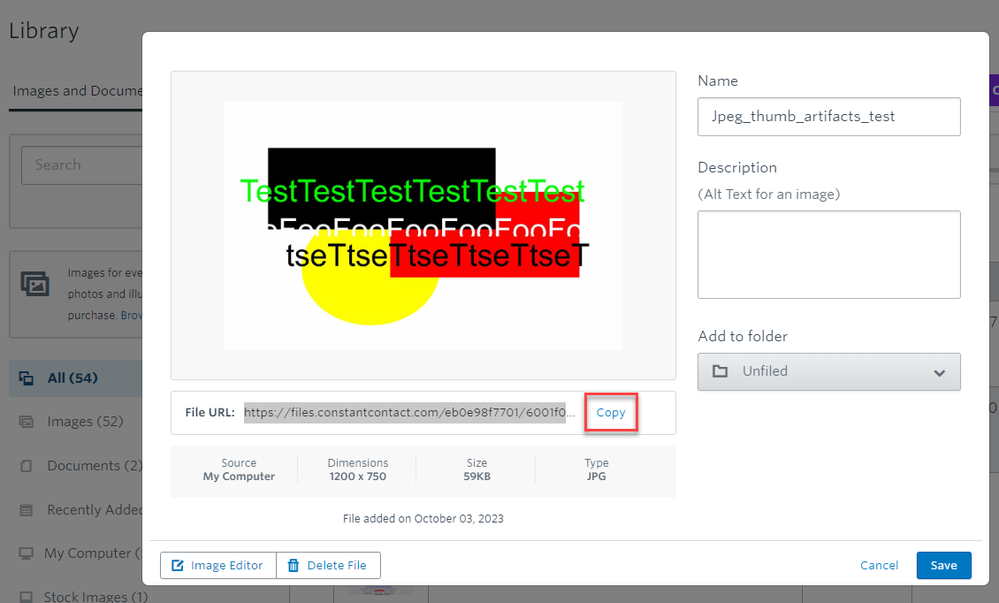
All of your most recent library uploads have been images - not documents. Therefore, they won't show as options of selectable documents to link to in your email. If you're trying to link to an uploaded image via a button or some text in your emails, you'd need to have a separate tab open to your Library, and link to the URL we provide for the uploaded image file. 


If you need an example visual of what you'd be copying to link in your email:


View original
Webinar

Is your small business or nonprofit losing time and engagement to outdated or confusing social media advice? April 23, 2026 2:00 pm ET

Popular Posts:

The world's largest virtual email marketing conference. November 12-13th.