
What’s Trending in 2026? Let’s Plan Ahead—Together. 📈

Automated Series - Send Followups to Recipients Who Did Not Click on Link
Hi! I am just getting acquainted with automated series, which I thought I would be able to use to manage a survey I am distributing. But I am hitting some roadblocks and need help. My situation is: I have two lists to which I am distributing the survey invitation. The campaign includes a link to the survey. After five days, I want to send a reminder to recipients who DID NOT CLICK on the survey link in the original campaign.
I don't see a way to set this up. My first step in creating the series is to select the trigger and none of the options are what I need, as far as I can tell, because "Do Not Click a Link" is not an option, only opening an email and clicking a link.
Many thanks for your help!
2 replies
Best reply by Kara_D
Hi !
Thanks for reaching out to the Community! Segments will let you Create a segment of contacts based on specific criteria. including people who did not click.
From your contacts page click Segments> Create Segment> name the segment so you can easily find it later.
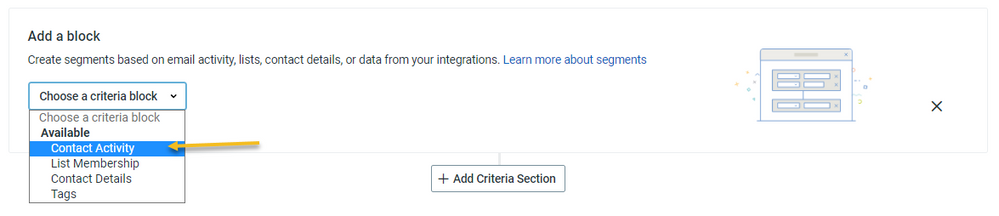
Then select the activities

Click Save and Preview. It may take a few minutes for your Segment to be created.
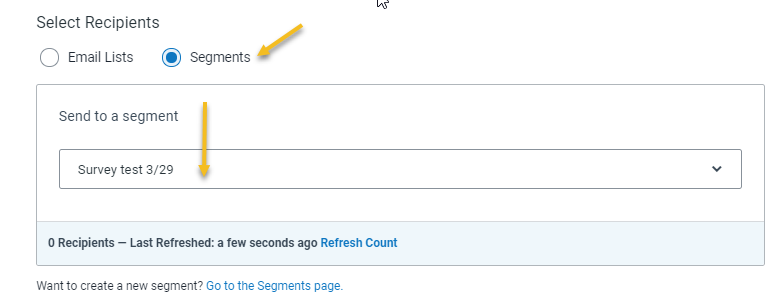
When you are ready to schedule your follow up email campaign you can schedule it to send to a Segment instead of a Emal List!
Join Our New Small Business Marketplace!
We're highlighting small businesses from our community. Add your business to the Marketplace to get discovered by new customers and support other entrepreneurs.

Popular Posts:
💌 Coming Soon: A New and Improved Canva Integration!
📊 What Industry Are You In? Cast Your Vote!
☃️What’s Your Open Rate MVP?