Cannot get correct info

Hello,

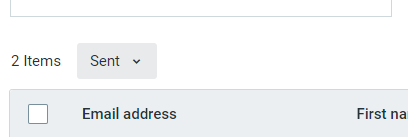
I used to be able to click on "open" or "click URL" options to check who opened the newsletter or clicked on a link. Now since you have changed things all the options just opens to people the newsletter has been sent. Very frustrating indeed!


Please provide me your new system how to find these answers.

Thank you

Larise
1 reply
Best reply by William A

Hello @larisek ,


The UI hasn't changed much in the past few years. If you're checking from the Reporting overview tab, then clicking any of the rate numbers for an email will default to the Sent view, in which case you can swap to clicks, opens, bounces, etc. through the little dropdown menu where it says Sent.


If you're already looking at the singular email's reporting page, you can click on its reporting numbers to open that specific info type without having to swap.


If you need reminders on how email reporting works:

View original

Join Our New Small Business Marketplace!

We're highlighting small businesses from our community. Add your business to the Marketplace to get discovered by new customers and support other entrepreneurs.