We primarily use CC for free community events and take registrations to collect all the necessary info (names, emails, and ages), then on the day of the event we need to track who actually shows up.
Is there a way to a) print a roster of people who have registered (including their guests' names) and/or b) check people in electronically?
1
1 reply
Best reply by Chris S
Hi ShannonP48, hosting free events for your community is a great idea to engage with people!
You have a few options here you can:
Export full registrant report
You have the option to export a detailed registrant report that contains information from your event, including tickets purchased and responses to registration form fields.
To export this report:
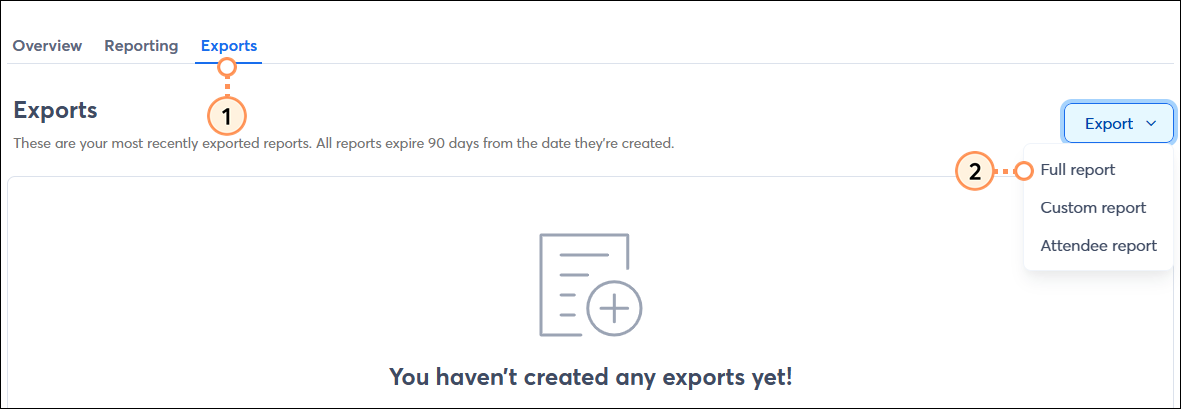
In the event dashboard, click the Exports tab.
Click Export > Full report.
The report will appear on the Exports table. Once the status updates to Complete, click the download icon.
Or you can Export an attendee report
Easily monitor and track your attendance with this simplified version of the full/custom reports. See a list of all your event attendees, including a column indicating who the attendee was registered by, for registrants who are not the primary registrant:
To export a new attendee report:
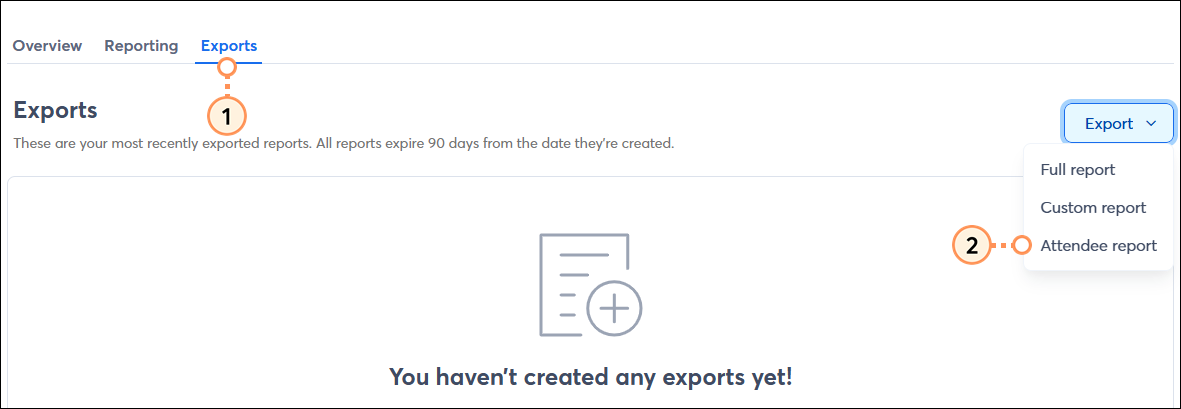
In the event dashboard, click the Exports tab.
Click Export > Attendee report.
The report will appear on the Exports table. Once the status updates to Complete, click the download icon.