
It used to be so easy for me to place 2 or 3 images or text blocks side by side in my campaign and now it's not working. What am I doing wrong?
How can I put 3 images side by side in my campaign?
1
1 reply
Best reply by Chris S
Hi CarolA643,
I wanted to share an example (screenshot below) from another email—it’s a great visual of the kind of layout you might be trying to achieve:
📷 (Example from another email)
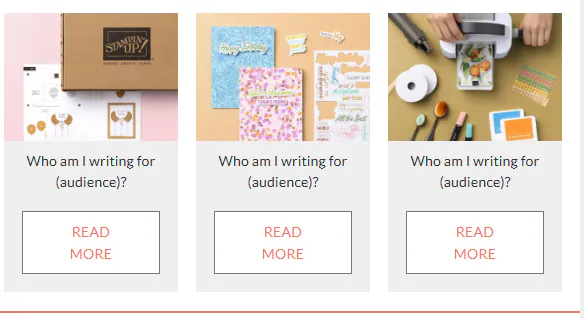
Each section has an image, some text, and a button stacked vertically—but the whole group is placed next to similar groups in a row. This can absolutely be recreated using one of a few methods:
How to Build Side-by-Side Blocks in Constant Contact
1. Use Individual Blocks to Build Your Own Columns:
Drag each block type (Image, Text, Button) into your layout and position them.
You can stack an image, then a text block, then a button—all in one column—and repeat that structure side-by-side with other columns.
Make sure each "card" is built with separate blocks for full flexibility.
2. Use Pre-Built Layouts:
Under the “Build” tab, look for the “Layouts” section—these are quick-start rows with two, three, or four columns.
You can drag one into your campaign and customize each column to include images, text, and buttons just like the screenshot.
3. Add Spacers for Fine-Tuning:
If you want more control, insert Spacer blocks between content blocks to help align things or create more even spacing between your "cards."
Webinar
Join our free, interactive event with expert Jay Schwedelson to learn data-backed strategies for high-performing subject lines. June 25, 2026

The world's largest virtual email marketing conference. November 12-13th.
