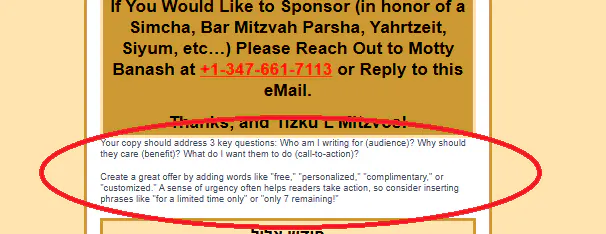
Thanks so much for bringing this up AbrahamE5 . To troubleshoot, I made a copy of your draft (so your original stayed untouched) and added “Test” to the end of the campaign name. You’ll see that copy was created on 9/22/2025. In the “Test” version, the placeholder text — “Your copy should address 3 key questions: Who am I…” — no longer appears. From what I can tell, this looks like an artifact of the copy process that I wasn’t able to fully remove automatically from your existing draft. Here are the steps I tried to utilize to clean it up.
1. Open the Campaign in the Editor
Go to Campaigns → Edit on the email you copied.
2. Locate the Placeholder Blocks
Scroll through your content, especially around table or text blocks. You may see template guidance text like “Your copy should address 3 key questions…”.
3. Delete or Replace the Text
Click directly inside the block.
Either replace it with your actual content, or use the trash can icon (Remove Block) to delete it if you don’t need it.
By recreating the desired content on the test version, I successfully removed the unwanted text. You are welcome to rename it as you wish and make use of it.