Re: More customization and formatting options for survey pages
Hello Community,
Ā
I'm new to the survey function and have two questions:
Ā
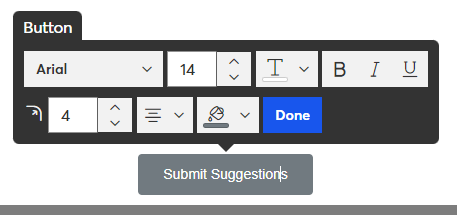
1. How can I edit text in the Submit Survey button? I want the button to read Submit Suggestions.
Ā
2. How do I edit the sign-off or attribution field at bottom? Currently the sign-off shows me and my business address, but my surveys and email campaigns (newsletters), etc. are in behalf of a client. The survey contacts know my client but do not know me.Ā
Ā
Thanks for any help!
HelloĀ @ClaytonG85Ā ,
Ā
While editing the survey, if you click in the button area at the bottom, you can edit the wording.
Ā
The footer of the survey is going to include your account's address, so it's going to match whatever you have setup on your My Account page.
Ā
If you're making surveys for clients with different businesses/organizations, then I'd recommend making the surveys in their own accounts. If you find yourself doing lots of work for different clients, then I might suggest looking into setting up your main account as a partner/affiliate, and having your clients setup as child accounts under yours.
Popular Posts:
š Coming Soon: A New and Improved Canva Integration!
š What Industry Are You In? Cast Your Vote!
āļøWhatās Your Open Rate MVP?