

In real estate, communication is everything, especially in a competitive market like Australia’s! That’s why Constant Contact’s digital marketing tools help you stay front of mind with buyers, sellers and potential leads at every stage of the journey.
In this marketing playbook, we'll take you through a bunch of tips, tricks, ideas and best practices to help you get started with real estate marketing.

Part 1: First Things First... KYC 🍗
This first step is all about WHO you are targeting. Knowing your customer, or KYC (often referred to as knowing your audience in marketing-speak) is key to any marketing activities. If you don't do this vital first step, you could end up wasting precious time and money on something that doesn't work.
This process involves understanding who you want to attract. In other words, who is your "ideal customer"? What are their key traits & demographics? What does your business need to do to attract them? Some people break these down into one or more 'customer personas', but we'll keep it fairly high level for now.
If you're a boutique real estate agent that tends to focus on chic inner city apartments, then a commercial property developer who builds transport warehouses is likely not your ideal customer.
Once you've worked out who you want to attract, the next step is working out how to attract them. Who are your competitors, what do you do differently and how are you better? This will help you uncover your unique selling proposition (USP).
💡 Andy's tip: To help you find your USP, I like to use the POD / POP / POI principle; this stands for Points of Difference, Points of Parity and Points of Irrelevance.
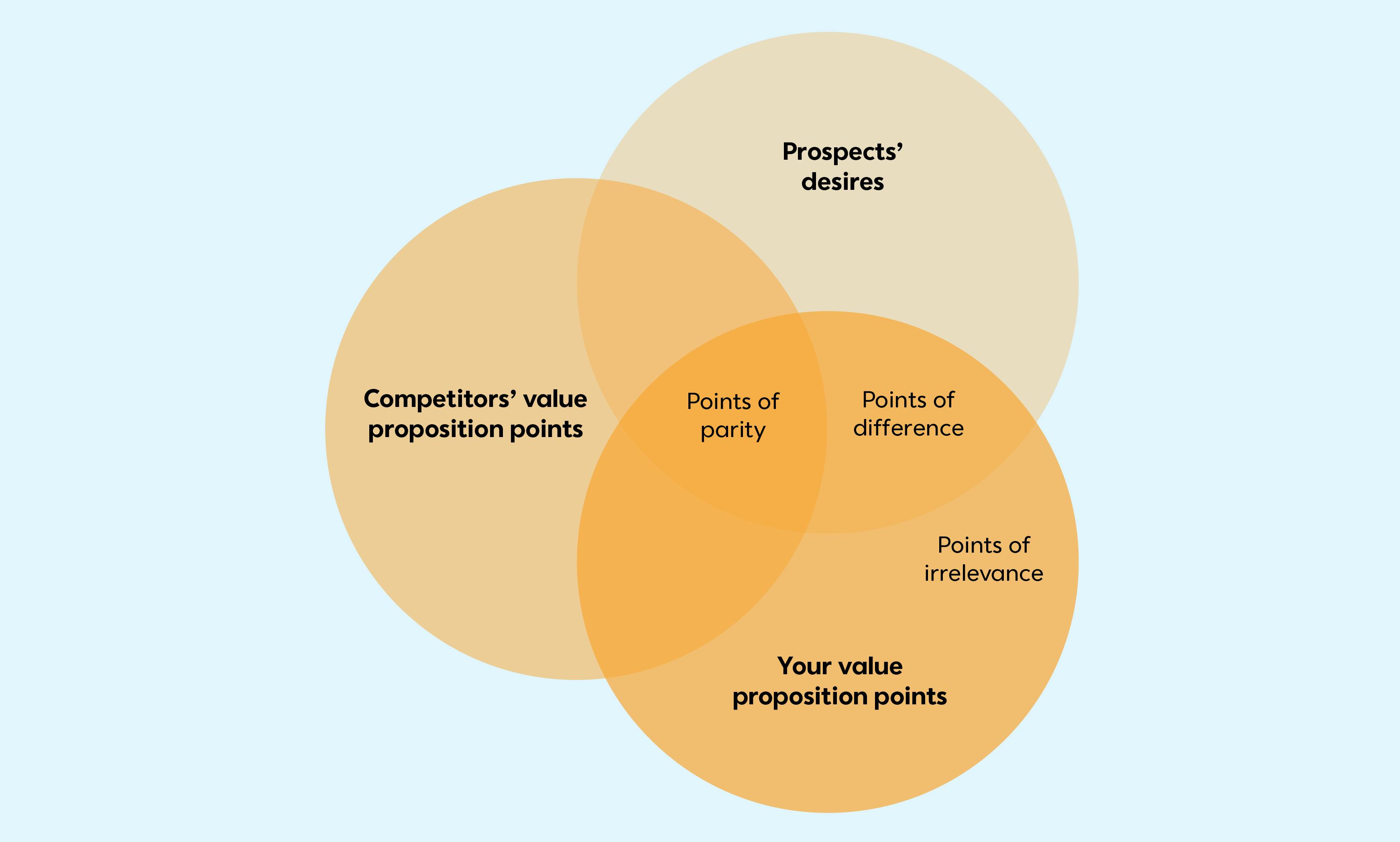
PODs (Points of Difference): PODs are the features that are important to your customers, and are not offered (or not available) from your competitors.
POPs (Points of Parity): POPs are the things (features) you offer that are important to your customers - but you also share these with your competitors.
POIs (Points of Irrelevance): POIs are the things (features) you offer, but that customers don't really care about.
Always focus your marketing efforts on your PODs. Use these on your website, in your sales & marketing emails, brochures, signage, and your Google & Instagram ads.
It's what you do well, so if you're being compared against others, you'll likely win that comparison. It will naturally attract the right-fit customers for you.

Part 2: Contact Fields & Segmentation
Most real estate agents will already have a list of contacts to import into Constant Contact - just make sure you have marketing consent first! Importing contacts is super easy; literally a couple of clicks and your spreadsheet is in the system - but it might pay to think about segmentation first. Doing so will reward you with less unsubscribes, higher engagement (clicks) and more email opens ...and we all want that, right?
Who Are They?
Think about your contact list for a moment. Are they prospective buyers, prospective renters, past buyers ...a mixture of all? And what are they looking to buy or rent ...a townhouse? Acreage property? An inner city apartment? If they're someone who's purchased a home with you already, how long ago did they do so?
As you can imagine, not all contacts are equal and, as such, your marketing message needs to change depending on the audience. There's that word again... "audience". It's vital to know who your contacts are because they're likely all at different stages of their 'marketing journey' (or buyers journey) with you, so a one-size-fits-all approach probably won't work.
Get the Timing Right
An email that wishes a young couple well on their 2nd year home purchase anniversary will likely result in an unsubscribe if it's sent to someone who's just started renting a property. Similarly, so will an email advertising the latest acreage land deals that's sent to someone who's signed up to your email list to see what inner city apartments are for sale. If the message is wrong or doesn't resonate, the contact will leave your list (unsubscribe).
It’s All About the Data
💡 Andy's tip: When it comes to your spreadsheet of contacts, adding a few extra columns for things like "buyer type" (renter, buyer), "property type" (apartment, acreage, townhouse, house, etc), "contact type" (prospect, customer) will do wonders for your open rate - because it means you CAN send the right emails to the right people at the right time. Essentially, you're now 'segmenting' your list and your email sends. Segmented sends have better engagement rates because they're relevant for the audience.
Once this data is in Constant Contact, you can easily create segments for these different groups of people - making it super easy to email the right group! You can also get smart when it comes to building your emails - create one email but have the text & imagery change depending on who's getting it (more on this later).

Part 3: Website Sign-up Form
Great, so you've got your contact list nicely segmented and imported into Constant Contact - but what about new contacts? Growing your list is just as important as marketing to your existing contacts. This is where sign-up forms can help.
They're quick and easy to build, they can be embedded onto your website (or linked from your social media accounts) and are a great way to grow your list through new contact subscriptions.
💡 Andy's tip: Remember how we discussed contact segmentation in the previous topic? Just because a new contact is signing up for your property eNewsletter through your website, doesn't mean you can't segment them either. Make sure you add your "buyer type" and "property type" fields to your sign-up forms, too.
This means new contacts can choose what they are interested in receiving emails about. Given you can add whatever fields you want to your sign-up form, you might also want to include a field for suburbs, price range - and so on.
What's in it for you: More data from your contacts so you can target & engage them more effectively.
What's in it for them: Emails that are more relevant to their interests and thus, a lower likelihood to unsubscribe.
...it's win-win in my books!

Part 4: Email & Subject Lines
Email Structure
When building your emails, they should generally always follow this structure;
Logo
Banner
The content (personalised with the recipient's first name, at bare minimum) - with a call to action of some kind
Your contact details
Social media links
Unsubscribe link (we automatically add this for you)
Email Design
Your emails should also use consistent branding and colours, and generally the same font throughout. Consistency is key when it comes to design.
💡 Andy's tip: Try our Brand Kit tool - it goes and grabs the colours, logo and imagery from your website to make email building a breeze!
Use headings to help build 'sections' in longer emails - though generally, 'less is more' when it comes to emails. Putting useful & interesting content online is also a great way to boost your website's SEO - and then you can simply link to it from an email using a read more block.
What's Your Call-to-Action?
Every email should have a point or desired action. Think of it this way - what do you want the contact to do as a result of getting this email? Should they book an appointment with you, should they fill in a survey, download a PDF, view a property? Use buttons for your key call to actions, as they stand out.
As a general rule of thumb, stick to 1 or 2 clear call-to-actions in your emails and don't confuse the message. If you need different call to actions for different types of contacts, then it might make sense to use our dynamic content function to make the email appear differently for your various contact segments (eg. renters see different content to buyers).
Subject Lines
Shorter subject lines seem to work better, but each industry and audience type (consumer vs. business) is different. The best thing to do is to try a few different variations (short vs. longer email subjects, subjects with vs. without an emoji, etc) by A/B testing your subject lines over time. This will let you see what resonates with your audience & come up with a winning formula. You can also try AI to suggest subject lines for you.
One thing that definitely works is personalising the subject line. You should see an increase in your email open rate when compared to a non-personalised subject line.
💡 Andy's tip: It's always a good idea to check your reports after you send an email. That way, you'll know who's engaged and which links they're clicking. You can even trigger automations to run based on whether contacts do (or don't) open your email, or whether they do (or don't) click on certain links. More on that in the next section.

Part 5: Automations
It's definitely worth considering automations as part of your marketing. After all, they're very good time-savers and just because it's automated doesn't mean it lacks that personal touch. Just like a regular email, an automated one can be personalised with recipient data and can include information specific to whatever your contact is interested in.
In many ways, an automated email is often more effective than a manually-sent one, because they automatically get the timing right based on clicks, opens & engagement (or lack thereof).
Automations for Real Estate
Why Automate?
Saves time: Automate repetitive communication tasks & free up time to focus on high-value activities like showing properties and negotiating deals.
Improved lead nurturing: Consistent and timely follow-up keeps leads engaged & moves them through the sales funnel.
Personalisation at scale: Segmenting your audience and sending targeted content makes communications more relevant and impactful.
Increased conversions: Nurtured leads are more likely to convert into clients.
Data and analytics: You'll still get insights into open rates, click-through rates, and engagement, allowing you to refine your strategies.
Brand building: Many real estate agents have a personal brand; often it's about the individual agent more than the company they work for. Automations help to maintain brand presence in the inbox, positioning you as a knowledgeable and reliable expert.
Automation ideas
Send a thank you email whenever a new contact joins your list, displaying the latest properties that match their interests. It's also a great way to introduce yourself and show some social proof like reviews, awards you've won or testimonials. (⏳ Setup time: 5 minutes or less - view guide)
Send an annually-recurring anniversary email to contacts that have purchased a property through you. Even though most home buyers re-engage after about 7 years, it keeps you top of mind during that time. (⏳ Setup time: 5 minutes or less - view guide)
Send educational content (often called a 'nurture series') about the home buying process - this could be an email series over time, eg. 4 emails over 4 weeks. Additionally, you could get super fancy and put a link or button in all of your general & eNews emails which, when clicked, will trigger this series to start automatically for those that click it! (⏳ Setup time: 10 minutes - view guide)
For those looking to sell, send a nurture series of emails over time with selling tips.
Immediately follow-up open home attendees with some further information or actions.
Send an automated email once someone successfully purchases a property through you, requesting a review or testimonial, and / or to refer a friend.
Trigger a secondary action based on what a contact clicks in your emails. For example, when a contact clicks the "Send me the buyers guide" link in your email nurture series, you can have Constant Contact send them the guide via email.
Tag contacts with additional data automatically, based on what they do / don't do when they receive certain emails from you.
💡 Andy's tip: There's a lot of ideas here, but I recommend starting small with an automated welcome email to begin with ...you can always build out from there over time!

Part 6: Social Media
Last of all, let's briefly talk about social media. Although you don't "own" the followers on social media (unlike email), it's still a channel worth marketing on. It's a great way to advertise new properties, announce recent sales successes and to build your personal brand.
With Constant Contact, you can post on social channels whenever you like. You can also schedule posts, as well as share an email on social media - a great way to save time and share already-made content, rather than reinvent the wheel each time. Our AI assistant can also write the post for you - just enter a prompt and off it goes!
💡 Andy's tip: I often get asked how to turn social media followers into email contacts. We have a great tool for this called a Sign-up Landing Page. It's a fantastic way to capture lead information and convert social followers into marketable contacts. More on this in the next section...

Part 7: Sign-up Landing Page
As mentioned above, you don't "own" your social media followers - which poses a bit of a problem if you've put all of your eggs into the one (social media) basket.
If the algorithm suddenly changes overnight or you get locked out of your social media account, there goes your entire marketing strategy! Getting help from a human at most social networks is also increasingly difficult. So how do we convert a 'social follower' into a marketable contact on your list? The answer... is a Sign-up Landing Page!
A sign-up landing page is a special page that we host for you, which contains information and a sign-up form. It's a great way to turn a social follower into an email contact that you own and have permission to directly market to - with personalised, trackable emails. It's easy to setup too - and you can customise the questions you ask on your sign-up form.
Once setup, you'll be provided with a public link to the landing page - which you can add to your social media profile as a link in your bio. When someone visits your page to receive some information, a guide, eBook, free resource or something else of interest to entice them to fill in the short form, the process of doing so adds them to your desired contact list in Constant Contact.
From here, you can setup a welcome email to send to them, or just email them sales emails, newsletters or whatever else you've promised them. Keen to learn more about our Sign-up Landing Pages? Follow our how-to guide.
💡 Andy's tip: Sign-up forms work best when there's an incentive on offer for joining your list. For example, "Help us pick our next doughnut flavours and you'll get a 10% off code to try them when they're released!".

Support & Resources
New to Constant Contact? Get started with a free trial today! If you get stuck or need a hand with anything, please reach out to our support team, explore the support knowledgebase or chat with others in the Constant Contact Community.
Here are some real estate marketing content & blog posts you might enjoy;
Real Estate Client Appreciation Ideas: Events, Gifts, and More
Real Estate Lead Conversion: Nurture Leads and Increase Sales
You might also be interested in these real estate episodes from our various podcasts;
Small Business Growth Podcast: Growth Marketing for Real Estate with Antonia Mercorella (CEO of Real Estate Institute of Queensland - REIQ)
Be a Marketer Podcast - Building Multiple Revenue Streams in Real Estate with Jacqui Luberto
Be a Marketer Podcast - The Art of Real Estate Branding with Christine George
Be a Marketer Podcast - Your Real Estate Marketing Playbook: Recap with Stephanie, Dave, and Kelsi
Happy marketing!
