Display the publication time and date

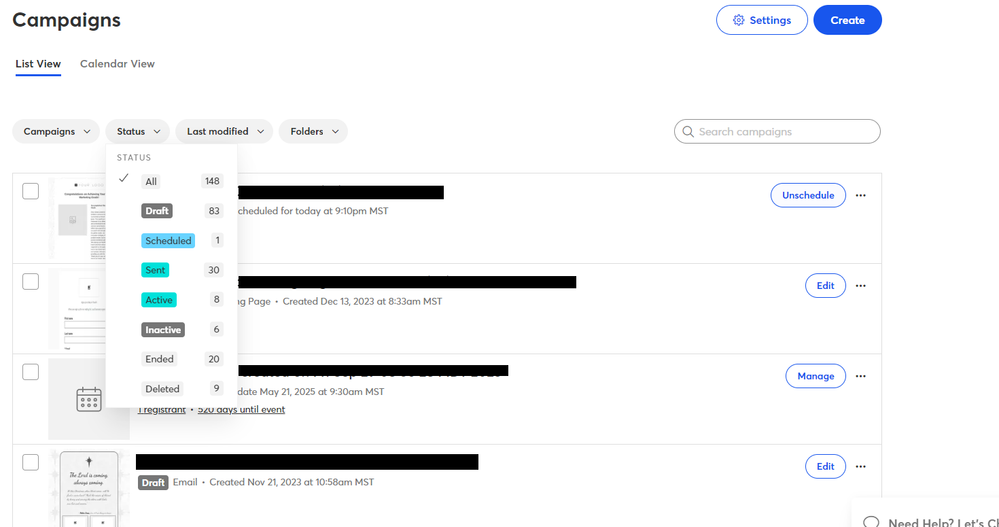
When I go to "Marketing Campaigns - All Campaigns" I can see that some of the campaigns are drafts. You should differentiate between drafts that are scheduled to be sent out (published) and those that have not been scheduled. Showing the date and time that a draft is to be published would be helpful. I may have more than one draft in progress - some of which are schedule and some of which aren't. This would save me time. Thanks! 

1 reply
Best reply by William A

Hello @DennisD8 ,


If an email is scheduled, it will explicitly have a status of Scheduled, and will show what date and time it's scheduled for. If an email has not been scheduled or sent, then that means it's in Draft status, and will reflect as such. This is the same on the All Campaigns page and the Emails page.


View original
Webinar

Is your small business or nonprofit losing time and engagement to outdated or confusing social media advice? April 23, 2026 2:00 pm ET

Popular Posts:

The world's largest virtual email marketing conference. November 12-13th.