
We're excited to share that a major upgrade to our Canva integration that is live in all accounts! You are now able to view, create, and edit Canva designs directly inside Constant Contact—no more switching between tabs or re-importing files.
💡 Did You Know?
Canva offers a free plan for everyone, and nonprofits can get Canva Pro for free!
✨ What’s New
With this enhanced integration, you can:
Instantly access all your Canva designs right from within Constant Contact.
Edit any image with Canva—even those not originally created in Canva.
Stay in sync automatically: Any updates you make in Canva will instantly reflect in Constant Contact.
This update makes it faster and easier than ever to create beautiful, on-brand content without leaving your workspace.
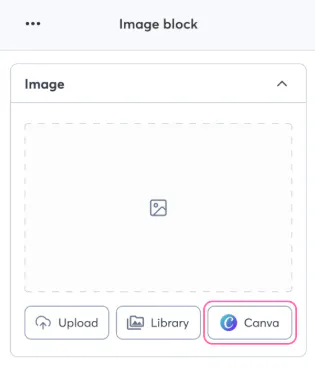
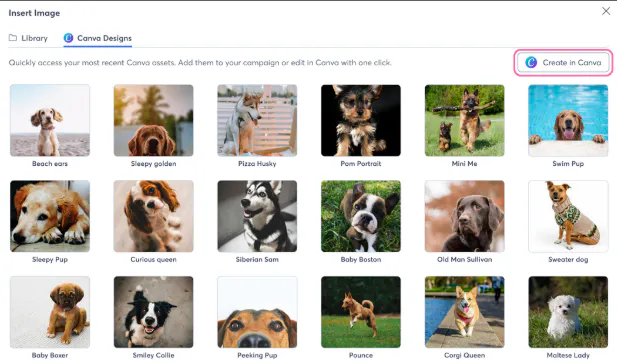
Add from Canva
When inserting an image into your email or viewing your Constant Contact Library, you’ll be able to:
Browse all your Canva designs instantly.
Select and import your favorites directly into your email—no extra steps needed!
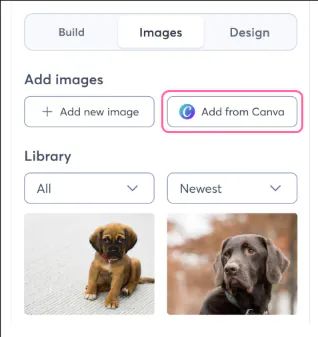
Within the Email Editor
Within the Email Editor
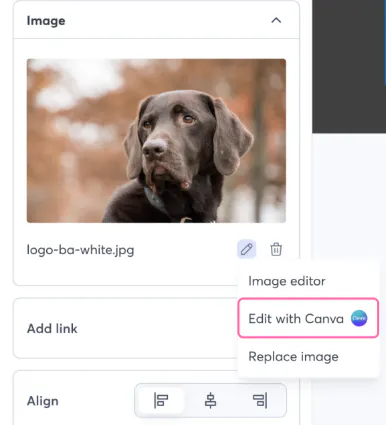
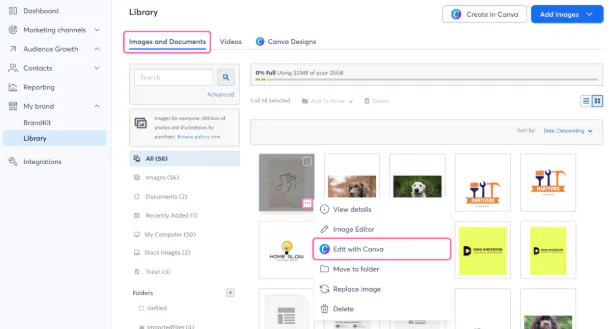
✏️ Edit with Canva
Want to tweak a design? You’ll be able to:
Edit any image (Canva or non-Canva) using Canva’s editor—right from your Constant Contact Library or email editor.
Save your edits automatically to your Library for reuse.
Within the email editor
From your Library
🪄 Create in Canva
Feeling inspired?
Start a brand-new design in Canva directly from your Constant Contact Library.
Your new creation will automatically appear in your Library, ready to use.
💬 We’d love your feedback!
What Canva feature are you most excited to use inside Constant Contact? Let us know in the comments below!
