
Hey Community!
We're excited to announce a new feature that many of you have been asking for: Mobile Stacking Control for multi-column email layouts.
What's the update?
When you create an email with multiple columns (like a two-column layout with an image on the left and text on the right), those columns automatically stack on top of each other when viewed on a mobile phone. Until now, you didn't have control over the stacking order.
Now you do!
Three ways to control mobile stacking
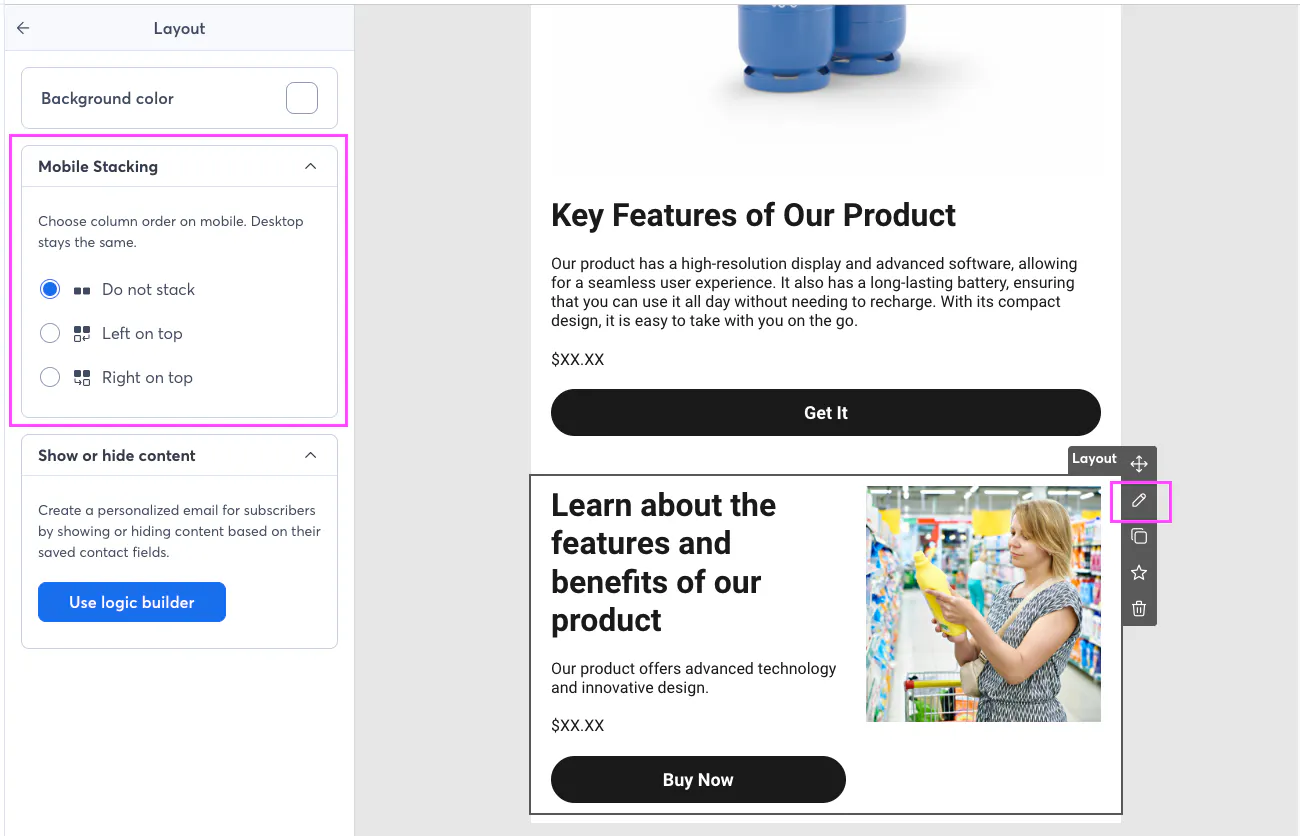
When editing a multi-column layout in your email, you can now choose from three options:
No Stack — Columns stay side-by-side on mobile instead of stacking. Great for small elements like social icons or rating stars that look better next to each other.
Left on top (Default) — The left column stays on top. Right moves under left.
Right on top — The right column stays on top. Left moves under right.
Why this matters
Let's say you have a layout with a product image on the left and a "Buy Now" button on the right. On desktop, it looks great. But on mobile, the image stacks first, pushing your button further down where people might miss it.
With Right-to-Left stacking, you can make that "Buy Now" button appear FIRST on mobile — right where your readers will see it.
How to use it
Open your email in the editor
Hover over the layout row you want to adjust
Click the Edit button (pencil icon) that appears in the quick action menu
Look for Mobile Stacking in the panel that opens on the left
Choose your preferred stacking option
Preview your email on mobile to see the change!
A few things to know
This works with any multi-column layout (2, 3, 4, or 5 columns)
Your desktop layout stays exactly as you designed it — only the mobile view changes
Existing emails aren't affected unless you edit them
Works great across all major email apps including Gmail, Apple Mail, and Outlook
We want to hear from you
We’re rolling this out gradually—it’s live for some of you already (starting April 2) and will be available to everyone by the end of the month. Try out the new mobile stacking controls and let us know what you think in the comments below. We love hearing how you're using new features in your email campaigns.
Happy emailing!
