make it easier to manage event attendees

Managing event attendees on Constant Contact can be a bit of a pain. Your system is OK for taking registrations. But with any live event anywhere, only about 60 per cent of registered people show up in my experience.

I get many e-mails from people saying they are no longer able to attend. You can try this process out for yourself, so many steps of logging into Constant Contact, going to the specific event, going to the page for list of orders, trying to search for the person, and then cancelling their attendance.

For the event itself I want a list of people's names and companies for making name badges. You make this quite difficult to export. Right now I can either only export name + email, or export full information as a csv, which when opened in Excel often gives one registrant two lines, so I have to delete half of the lines.

Then if someone does not show up, I would like an easy way to record that they did not attend. All i can do is 'cancel' their attendance as above. So I don't have any record of whether they informed me in advance they could not attend, or just did not show up.

Finally I would like to use Constant Contact as my data management system of registrants for past events, and your system is not so useful for this. We have different categories of attendees (speakers, sponsors, paying delegates from suppliers, free delegates from buyers). There is no easy way to record this, other than by asking people to register by purchasing a different 'ticket'.

One more point, I dislike that you force me to charge delegates a booking fee if they want to pay by credit card. So I have to create a confusing option where delegates (who would normally pay) can register free on Constant Contact and are told they will get an invoice from our company later.
Best reply by William A

Hello karljeffery ,

As far as cancelling attendees, this is pretty standard from what I've seen in other event systems. You have to navigate to the applicable event, select the registrant, and cancel their order or change their registration status. Is there a specific step in this process you feel is extraneous?

Since our system isn't designed to handle only events, we do not require event attendees to also make accounts with us. Therefore, their ability to manage their own registrations isn't something that's going to be on our radar at this time.

_______

You can export custom reports that would include just the name and company info. Additionally, if a registrant has multiple guests, it will likely cause multiple lines under the same technical registrant.

_______

If you wish to make a special distinction between those who said they couldn't attend vs no-shows, I'd advise recording that in the exported report. Our system isn't designed for making those distinctions.

_______

You can utilize either separate event campaigns for separate types of people attending the same event, or you can utilize different ticket types, that only show when a particular code is put in - e.g. send an invite to your speakers list with the "Speaker" code included, so they can enter that and see their particular ticket type. Your other option, is to just make a required field where they say whether they're a normal attendee, speaker, etc. on the registration form.

_______

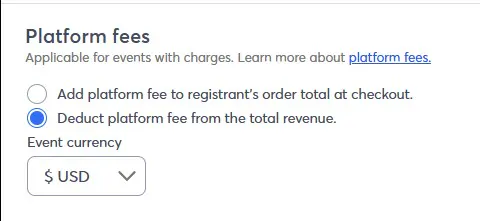
This is a reality of all event systems with online payment methods. If you don't want your attendees paying the processing fees, then your other option is to have it taken out of what you receive.

If you want only specific attendees to have to avoid this, consider setting up a separate event campaign for those special guests/speakers/delegates to register through.

View original
Status
No Action
2 replies
Release Notes

Take a look at our latest product updates.

Webinar

Join us to learn about successful email lists, from onboarding to database maintenance. May 28, 2026 - 2:00 pm ET

Popular Posts: